Your Customer Communications Center
All your conversations. All in ONE place.
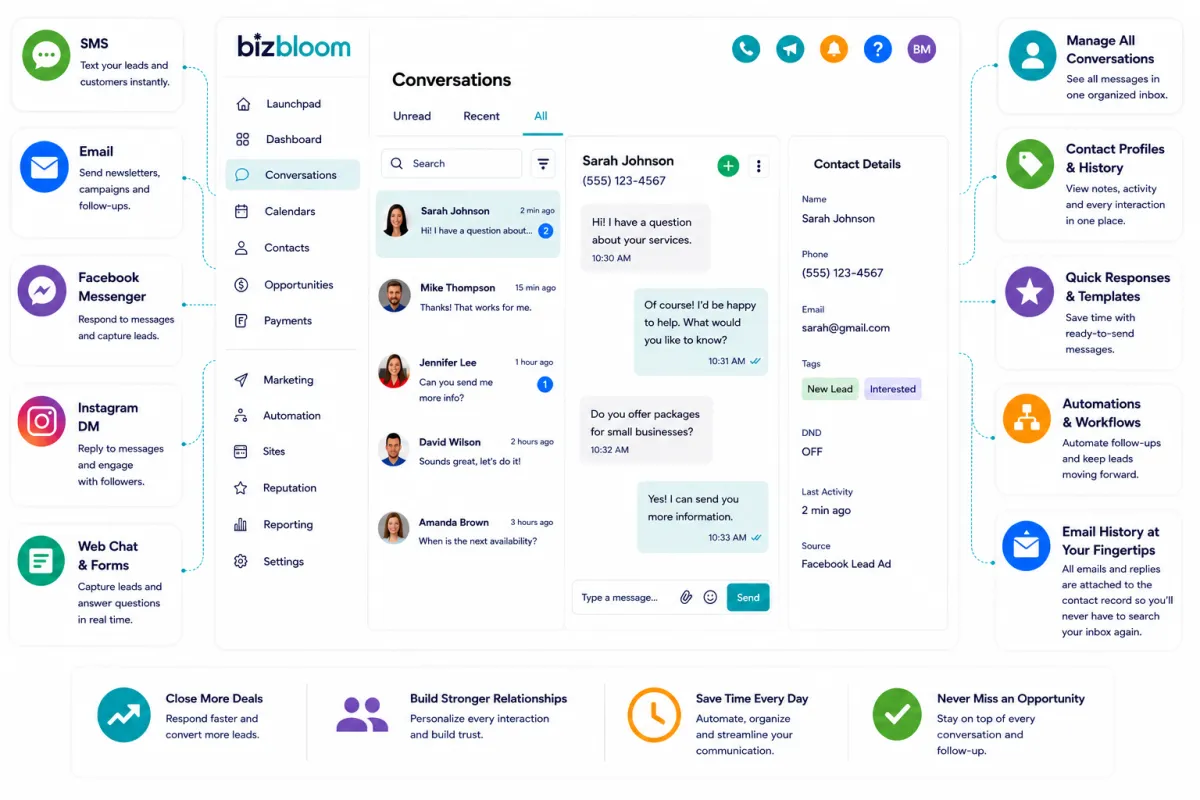
Keep Every Customer Conversation Organized In One Place
When customer conversations are scattered across texts, emails, social media messages, missed calls, and web chats, it becomes incredibly easy for opportunities to slip through the cracks.
BizBloom helps bring your customer communication together into one organized system so you can respond faster, stay more consistent, and create a smoother customer experience.
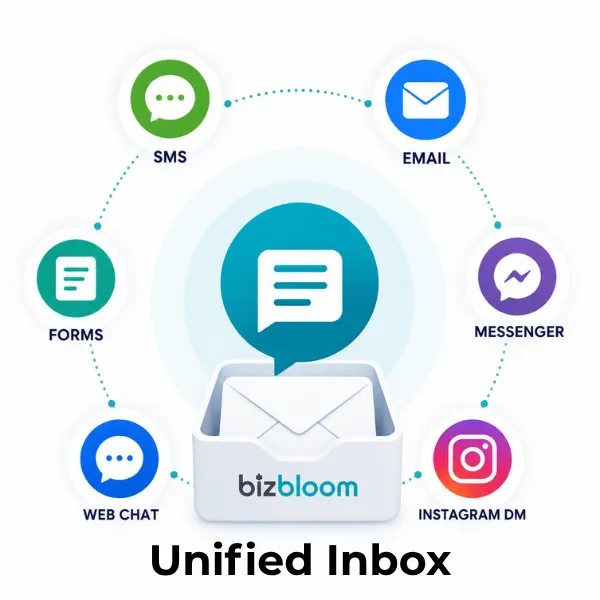
One Inbox For Your Business Conversations
Manage:
Text messages
Emails
Facebook Messenger
Instagram DMs
Website chat
Form submissions
Missed calls
…all from one place.
No more bouncing between apps trying to remember where a conversation happened.
Respond Faster Without Feeling Constantly Interrupted
Customers expect quick communication.
But most business owners are already stretched thin trying to serve customers and run the business at the same time.
For many businesses (e.g. plumbers, massage therapists, ...) , the difference between getting new business and that business going to their competitor is how quickly the customer can get their questions answered...to feel like they're important to you.
BizBloom can help you respond immediately 24/7 with our AI Employee and also know:
Who to follow up with
What to post
When to send emails
Where leads are coming from
Which customers need attention
…BizBloom helps organize it all into one connected system.
Never Lose Track Of Customer Conversations Again
Every interaction stays connected to the customer record so you can quickly see:
Previous conversations
Notes
Emails
Text history
Appointments
Activity history (form & survey submissions, website visits, payments, ...)
No more wasting time searching through your inbox trying to piece together the conversation history.
Create A Better Customer Experience
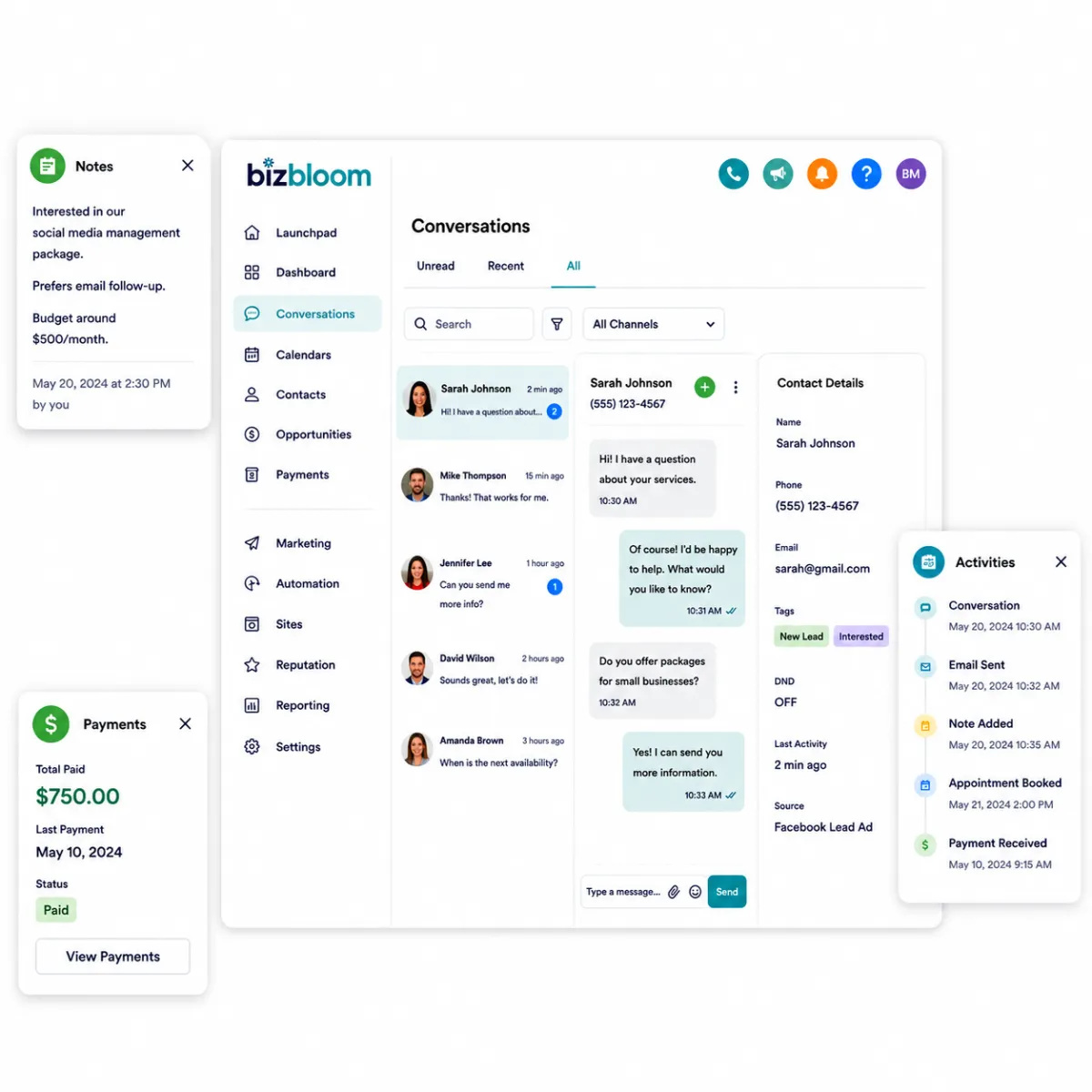
Every interaction stays connected to the customer record so you can quickly see:
Previous conversations
Notes
Emails
Text history
Appointments
Activity history (form & survey submissions, website visits, payments, ...)
No more wasting time searching through your inbox trying to piece together the conversation history.
Choose The BizBloom Setup That Fits Your Unique Business
Whether you want a powerful business system, flexible AI support, or a fully AI-powered experience, BizBloom gives you a smarter way to run and grow your business.
Scroll down below comparison table see expanded core features
* Some features have additional per-use charges
Not Sure Which Option Fits Best?
We’re happy to help you choose the setup that makes the most sense for your business, goals, and communication volume.
Key Features & Capabilities
BizBloom has a very comprehensive set of features and functionalities. Listed below are the high-level features most often needed and requested by small business owners. If what you're looking for isn't listed or you want more details, please schedule some time for us to get you the answers you need.
Lead Management & CRM
CRM and Contact Management
Keep all customer conversations, notes, tasks, and activity history in one place.
Sales Pipeline Tracking
Visually manage leads through every stage of the sales process.
Custom Opportunities and Tags
Organize contacts using tags, custom fields, and segmentation.
Unified Conversations Inbox
Manage email, SMS, social messages, and other conversations from one inbox.
Multi-Location Management
Manage multiple businesses or locations from one centralized system.
Team Management and Permissions
Control team access and organize workflows across staff members.
Marketing & Lead Generation
Email Marketing
Send newsletters, campaigns, and automated email sequences.
Two-Way Text Messaging
Text customers directly from the platform.
Social Media Scheduling
Schedule and manage social media posts across platforms.
Chat Widget for Websites
Add live chat and lead capture tools to your website.
Forms and Surveys
Create lead capture forms, surveys, and customer feedback forms.
Landing Page Builder
Build landing pages and lead capture pages.
Funnel Builder
Create sales funnels with bump orders designed to convert leads into customers.
Website Builder
Build and manage websites inside the platform.
Automated Review Requests
Automatically request Google, Facebook, and other customer reviews after appointments or services.
Automation & Productivity
Marketing Automation
Automate follow-ups, reminders, nurture campaigns, and customer communication.
Workflow Automation
Automate repetitive tasks across sales, marketing, and operations.
Automation Templates and Snapshots
Quickly deploy proven, pre-built systems, automations, and workflows.
Internal Notifications and Task Automation
Automatically notify team members and assign tasks.
AI-Powered Chat and Automation
Use AI tools for automated or semi-automated phone, chat, website, and reviews conversations, lead qualification, appointment setting, and response support.
Communication Tools
Missed Call Text Back
Automatically text customers when a call is missed.
Call Tracking and Recording
Track and record inbound and outbound calls.
Voicemail Drops
Send pre-recorded voicemail messages directly to customers.
Mobile App Access
Manage conversations and business activity from your phone.
Scheduling & Client Management
Online Appointment Scheduling
Ability for customers to book appointments online.
Calendar Management
Manage availability, team calendars, and appointment workflows.
Multiple Calendar Options For Your Business Use Cases
Use different types of calendars based on your business needs: personal, class, team distribution, multiple-person, group, service, rooms & equipment, and rental calendars
AI Phone, SMS, & Website Appointment Setting Chatbots
Train AI bots to drive conversations to and actually book appointments.
Sales, Payments & Revenue
Online Payments and Invoicing
Accept payments, send invoices, and manage transactions.
Recurring Revenue Tools
Manage subscriptions and recurring billing.
Memberships and Courses
Host online courses, memberships, and client training portals.
Reputation & Customer Experience
Reputation Management
Request and manage online reviews.
Customer Reviews+
Display Google Reviews, Facebook Reviews, and survey feedback on your website.
Reporting & Business Insights
Reporting and Analytics
Track leads, sales, appointments, and marketing performance.
Email and SMS Campaign Tracking
Monitor opens, clicks, replies, and engagement.
Customizable Dashboards
View important business metrics in one place.
Integrations & Customization
Third-Party Calendar Integration
Sync with Google Calendar and other scheduling tools.
Zapier Integration
Connect thousands of additional applications without custom development.
Integrations and API Access
Connect with third-party tools and customize workflows.
Custom Fields and Data Collection
Capture and organize the exact customer information your business needs.
Category 2 Common Use Cases
Networking
blah blah blah

Blog
blah blah blah


© 2024 Dobier Investments LLC